
Why isn't my campaign showing up on my store?
Quick answer
On Shopify, open Theme Editor > App embeds and make sure the CrazyRocket script is enabled, then refresh the page a couple of times. Check that the campaign is enabled and that no page, referrer or country filter excludes the page. If it still doesn't show, look for JavaScript errors in the browser console: a broken script left by another app can stop Shopify's loader before CrazyRocket runs.
Shopify App Embed
The most common cause on Shopify is that the App embed is not active on the theme.
It takes just a minute to activate it from Theme Editor > App Embeds > CrazyRocket Script
(Refresh the page a couple of times to let Shopify load the new script).
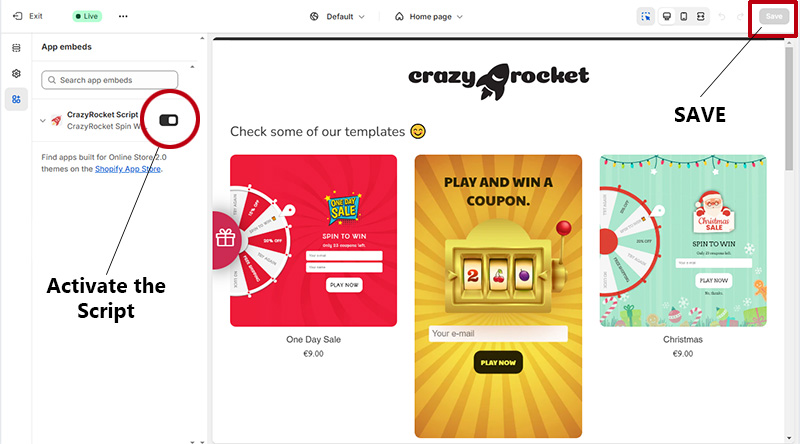
You can also find a video here: https://app.screencastify.com/watch/PebVquPYvvBuovEcLJjh
If the App Embed is enabled, please check the following:
- Make sure the campaign is enabled
- The start date must be set to a date in the past
- Ensure there are no restrictive PAGE, REFERRER and COUNTRY filters
- If you embedded the campaign on a landing page, ensure the code has been pasted inside the HTML view
- Ensure you shop is not using the SLIM version of jQuery
- Ensure there are no javascript errors on the page (see next section):
JavaScript Errors
Your theme might contain javascript errors (not related to our App!) that stop Shopify's asyncLoader before our main script gets loaded. As the script can't be loaded, we can't render the user interface.
These errors might be caused by Apps that left broken parts of code once uninstalled.
Check your browser's console log to see if this line of code is failing:
in such case, replace:
with
According to this post on Shopify:
People also ask
The pop-up appears a few seconds after the page. Is that normal?
Yes. Shopify loads the script asynchronously after your content. Speed optimization apps may delay it until the first interaction: whitelist CrazyRocket there. See loading time.
I joined the campaign while testing and now it never shows again.
Use the Reset client's cache button on the campaign, or open the store in a private window. See what the button does.
Still stuck?
Our support team always replies. Send us a message and we'll help you sort it out.